
Add Sawarri to your home screen
Sawarri then opens as a full-screen app. Your browser does the adding — here is where the option is:
Sawarri then opens as a full-screen app. Your browser does the adding — here is where the option is:
Most carpooling in Pakistan works one way round: a driver posts a ride, and passengers look for it. That is fine when someone has already posted your route. When nobody has, you are stuck refreshing WhatsApp groups and typing “seat required” into Facebook posts that are buried by the next morning.
A ride request flips it. You post the trip you need — where from, where to, when, and how many seats — and it goes onto Sawarri’s ride requests page, where drivers going your way can find you and call or WhatsApp you directly.

1. Log in and open “Ride requests”. Sign up or log in (Google works), then open Ride requests in your passenger dashboard.
2. Fill in your trip. From, To, the date (or tick Daily commute if you need it every day), the time, how many seats you need, and — if you like — a budget per seat and a short note for drivers. Add your mobile number and tick the box that lets drivers see it.
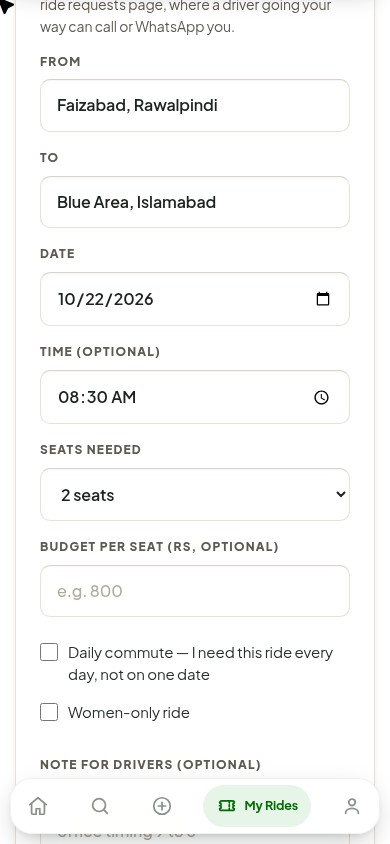
3. Tap Request Bhejein. Your request goes live on the ride requests page straight away. A driver who drives that way taps Show the number and calls or WhatsApps you to agree the pickup and the fare.
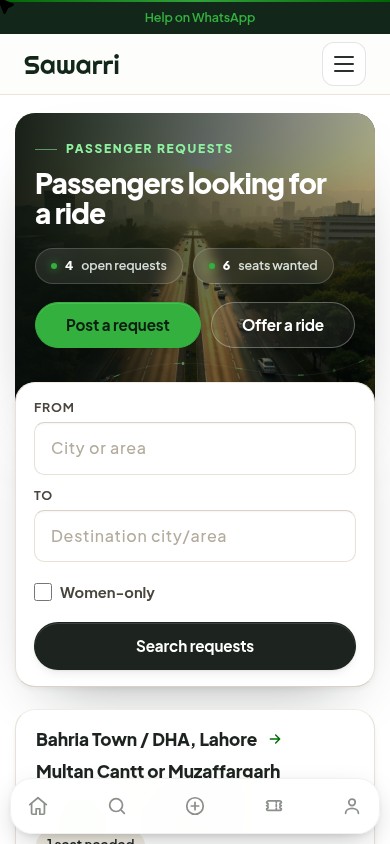
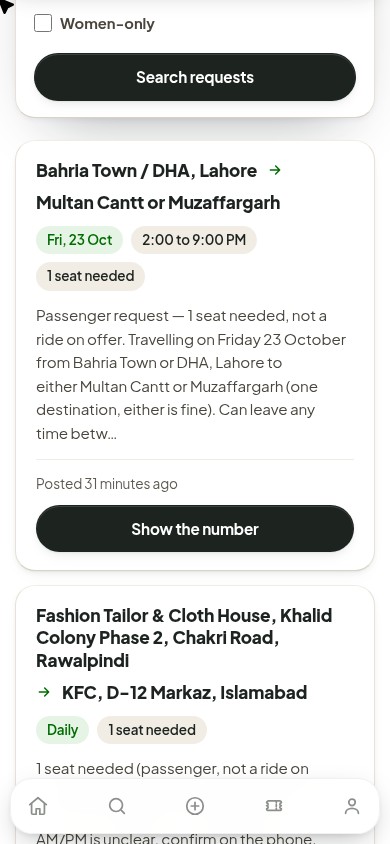
Each request shows as a card: your route, the day or “Daily”, the time, how many seats you need, your budget if you gave one, and your note. Your number is not printed on the page — it only appears when a driver taps Show the number, and only because you ticked the box allowing it.
Agar board par aap ke raaste ki ride nahi, to apni ride request daalein: kahan se, kahan tak, kis din, kis waqt aur kitni seats chahiye. Aap ki request ride requests page par aa jayegi, aur us raaste ke drivers aap ko call ya WhatsApp kar sakte hain. Request daalna muft hai, Sawarri koi commission nahi leta, aur aap ka number sirf tab dikhta hai jab driver “Number Dekhein” dabaye.
Does it cost anything? No. Posting a request is free and Sawarri takes no commission. You agree the fare with the driver directly.
Is my number public? It is not printed on the page. A driver has to tap Show the number on your request to see it, and it only appears because you allowed it in the form.
How long does my request stay up? A dated request disappears once the date has passed. A daily request stays up for 30 days. You can close either one at any time from your dashboard.
How many requests can I post? Up to three open requests at a time — close one before adding another.
Talk on the phone before you travel, meet at a public place the first time, check the car and number plate match what the driver told you, and share your trip with someone at home. The safety guide has the full list, and there is a separate guide to carpooling safely as a woman in Pakistan.
Need a seat? See the ride requests page or search the rides already posted. Driving with empty seats? Check what passengers need on the requests page, or offer your ride — you set the fare and keep all of it.
Related: carpooling meaning in Urdu · monthly pick and drop · all carpool guides